
Version 1.4.3
18 October 2026 · Windows 10 / 11, 64-bitMore input formats. Updates when you ask.
Version 1.4.3 adds ALAC input in M4A files and Opus input when Microsoft’s free Web Media Extensions are installed. It includes the M4A/AAC and WMA input support introduced in 1.4.2. These formats work in the deck’s LOAD window and Batch Convert.
Click the TapeTalk badge → CHECK FOR UPDATES to check for a newer release. The app connects only when you press the button, sends no Machine ID, activation code or recordings, and offers to open the download or release-notes page in your browser. It does not download or install updates automatically.
Batch conversion and stereo mixdown
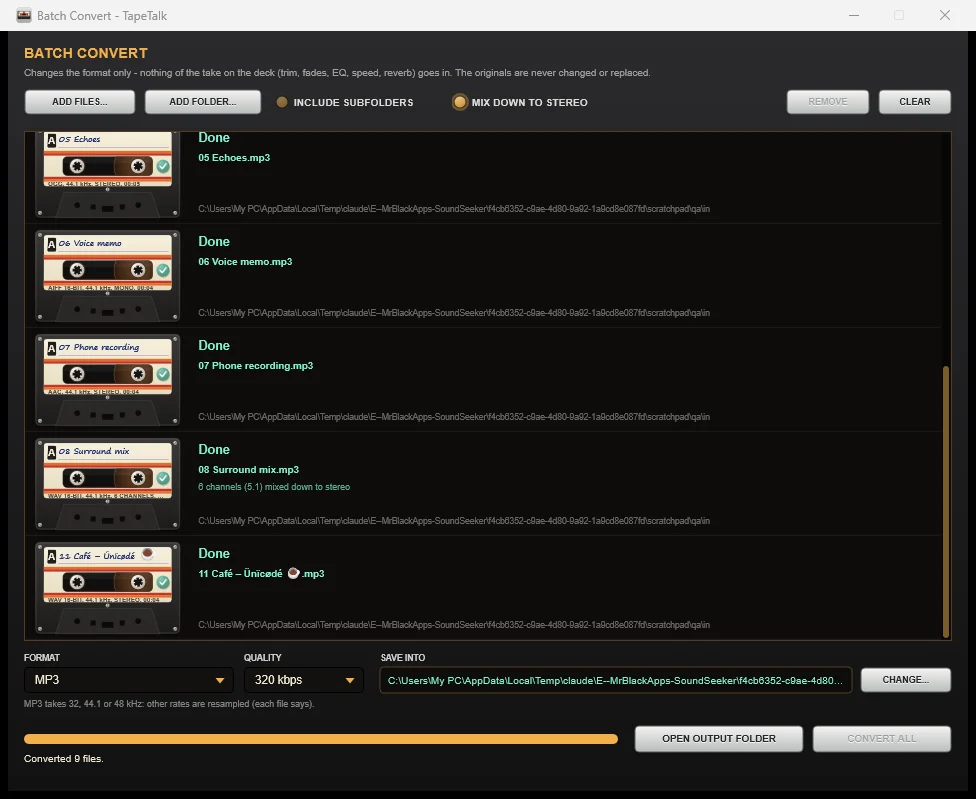
Batch Convert is available from LOAD → Batch Convert files… in both Simple and Advanced mode. Add files or a folder, choose an output format and destination, and convert them together. Every file appears as a cassette, with its own progress and status.
- Write WAV, FLAC, MP3, Ogg Vorbis or AAC (.m4a).
- Optional MIX DOWN TO STEREO for supported multichannel audio, including 5.1 and 7.1.
- Your original files stay untouched. Existing output files receive a new numbered filename.
- Tags and artwork are kept where the input and output formats support them.
- Cancel safely: completed files are kept. Conversion waits while TapeTalk records.
Supported formats
| Read | Write |
|---|---|
| WAV, AIFF, FLAC, Ogg Vorbis, MP3, M4A/AAC, WMA, ALAC; Opus with Web Media Extensions | WAV (16 / 24-bit, 32-bit float), FLAC (16 / 24-bit), MP3, Ogg Vorbis, AAC in M4A |
M4A/AAC, WMA and ALAC use Windows codecs. Opus requires Microsoft’s free Web Media Extensions; TapeTalk offers a Store link if they are missing. Windows N editions require the Media Feature Pack for Windows-based decoding. FLAC output is available in Batch Convert; the deck’s SAVE menu still offers WAV, MP3, OGG and AAC.
About stereo mixdown and metadata
MIX DOWN TO STEREO is off by default. When enabled, supported 3.0, quad, 5.0, 5.1, 6.1 and 7.1 layouts are mixed to stereo. Centre and surround contributions are reduced by 3 dB, LFE is omitted, and the mix is scaled for headroom. Mono and stereo inputs keep their channel configuration. WAV and OGG outputs do not carry cover art; each conversion reports metadata limitations.
Updating an existing copy
Close TapeTalk, download the installer below and install the update. This release uses the same activation system: your existing valid code works on the same PC. Batch Convert is included without another purchase. Keep a copy of your activation code and any projects you are working on.
Download TapeTalk 1.4.34.7 MB installer · 14-day full-feature trial for new users · $29 USD one-time licence